Key points
- Use a professional CAN interface with reliable timestamps and sufficient bandwidth.
- Confirm channel, bitrate, sample settings and CAN FD configuration before the test.
- Capture a baseline and clearly mark every physical action.
- Store an untouched raw file before filtering or conversion.
- Validate message rate, errors and dropped frames before starting analysis.
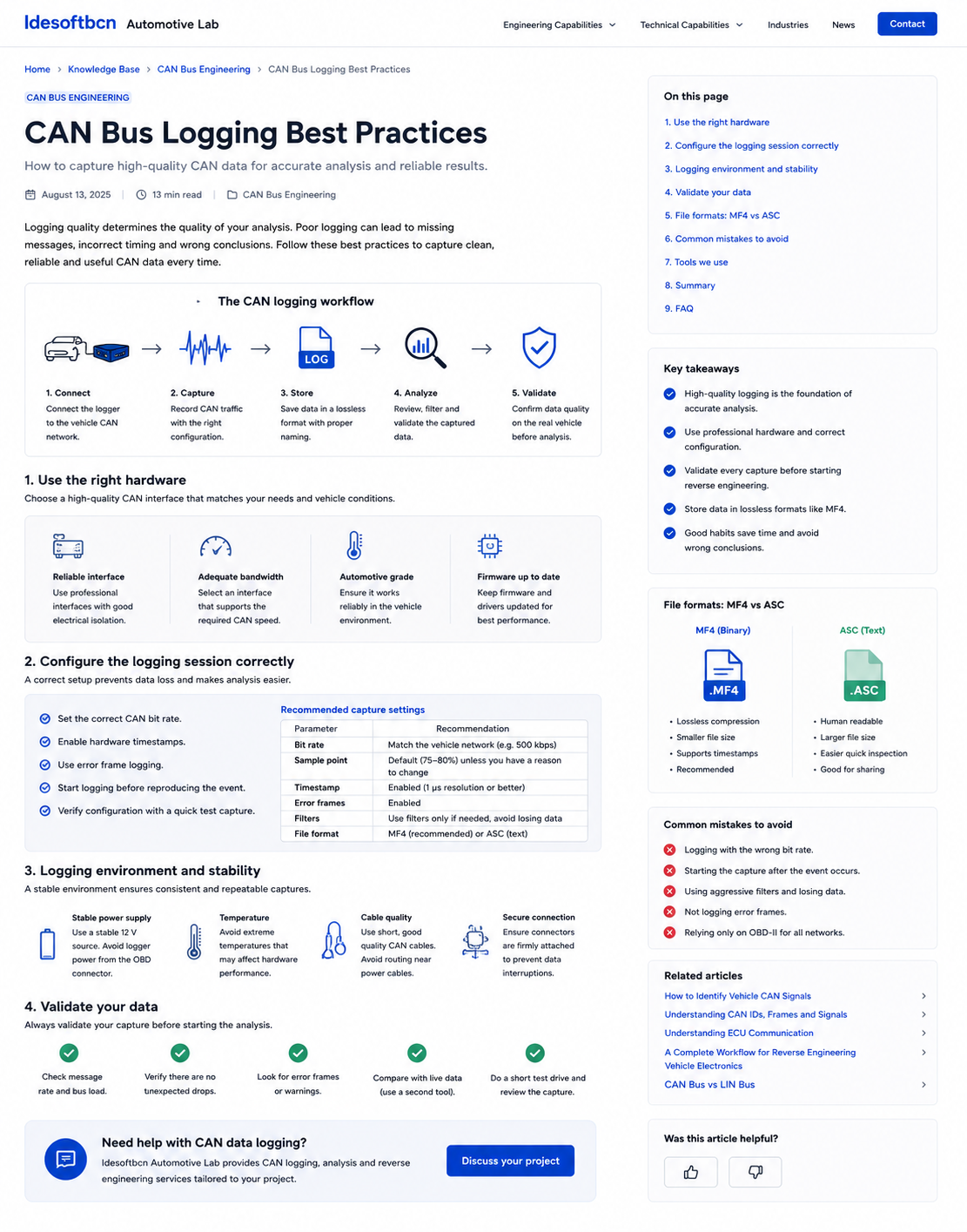
1. Use the right CAN logging hardware
The logger should support the vehicle network being tested, including the required number of channels, nominal bitrate and, where necessary, CAN FD data-phase bitrate. Electrical isolation, stable drivers and hardware timestamping are particularly valuable when captures will be compared across tools or synchronized with external measurements.
Bandwidth must be adequate for the expected bus load. An interface that silently drops frames can create false conclusions, especially when searching for counters, checksums, event-driven messages or short diagnostic exchanges.
| Hardware characteristic | Why it matters |
|---|---|
| Hardware timestamps | Provide stable timing independent of operating-system scheduling. |
| Electrical isolation | Reduces ground-loop risk and protects the analysis equipment. |
| Multiple CAN channels | Allows simultaneous capture of separate vehicle networks. |
| CAN FD support | Required for networks using flexible data-rate frames. |
| Error-frame reporting | Helps detect physical or configuration problems. |
2. Configure the logging session correctly
Before recording a test, confirm the physical channel, bitrate and frame type. For CAN FD, verify both arbitration and data-phase settings. A quick test capture should show plausible identifiers, cycle times and bus load without unexpected error frames.
Enable high-resolution timestamps and error-frame logging where supported. Apply acceptance filters only when necessary: aggressive filtering can remove the exact traffic needed later. It is usually safer to capture the complete network and filter during analysis.
Start recording before the event
Begin logging early enough to capture a stable baseline and the transition into the event of interest. Starting after a warning, state change or button press has already occurred removes valuable context and may hide the message responsible for the transition.
3. Control the logging environment
Logging conditions should be documented and repeatable. Record ignition state, engine state, battery voltage, active accessories, approximate ambient conditions and any diagnostic session that may influence network behaviour.
Use secure connectors and route CAN cables away from high-current wiring where practical. Ensure the logger has a stable power source and sufficient storage. Unexpected resets, loose connectors or thermal problems can corrupt a long capture without being immediately obvious.
4. Validate every capture
Do not assume that a file is usable simply because it opens. Review the recording before leaving the vehicle or test environment. Confirm that all expected channels are present, message rates look plausible and the actions performed during the test are visible in the data.
- Check the capture duration and timestamp continuity.
- Confirm there are no unexpected gaps or dropped-frame indications.
- Review bus load and dominant message cycle times.
- Inspect error frames or warning counters.
- Compare a known live value using a second reference where possible.
5. Choose a suitable file format
The raw format should preserve channel information, timestamps, identifiers, direction, frame flags and payload data without loss. MF4 is well suited to structured, compact storage and synchronized measurement data. ASC is human-readable and useful for quick inspection or exchange, although files are typically larger.
| Format | Advantages | Considerations |
|---|---|---|
| MF4 | Compact, binary, structured and suitable for large captures | Requires compatible tooling for inspection |
| ASC | Text-based, easy to inspect and widely exchangeable | Larger files and slower processing at scale |
| CSV | Convenient for selected signals and spreadsheets | Usually unsuitable as the only raw evidence |
Keep an untouched master capture. Converted, filtered or decoded files should be treated as derived artefacts that can be regenerated from the source.
6. Common logging mistakes
- Using the wrong bitrate or CAN FD settings.
- Starting the capture after the event has already occurred.
- Changing several vehicle conditions at the same time.
- Applying filters that remove unknown but relevant traffic.
- Failing to record error frames and channel metadata.
- Relying only on the OBD-II connector when the target bus is elsewhere.
- Saving files without notes, event markers or clear names.
7. A repeatable logging workflow
- Define the engineering question and target network.
- Connect the logger and verify physical and protocol settings.
- Record a stable baseline.
- Perform one controlled action at a time and repeat it.
- Add event markers or synchronized notes.
- Stop the capture only after the system returns to a stable state.
- Validate the file immediately and preserve the raw original.
A consistent file name can include project, vehicle, network, test, date and revision. Avoid including confidential customer or vehicle information unless the storage policy explicitly allows it.
FAQ
Frequently asked questions
Which CAN log format is best?
Use a lossless format that preserves timestamps, identifiers, channels, frame flags and payloads. MF4 is efficient for structured datasets, while ASC is convenient for quick human inspection and sharing.
How long should a CAN capture be?
Long enough to include a stable baseline, the relevant actions and repeated state transitions. Several short structured captures are often easier to analyse than one long unstructured recording.
Should diagnostic traffic be logged separately?
When possible, mark or separate actively generated diagnostic traffic so it is not confused with normal network behaviour.
Engineering support
Need reliable CAN capture and analysis?
Idesoftbcn Automotive Lab supports vehicle CAN logging, signal discovery, ECU analysis and reverse-engineering validation for engineering teams.
Discuss your projectContinue reading